v0.1.0-alpha.2 · pre-release

Debug your RTL without the headache.

Stop staring at green waves. Riptide is a waveform debugger for the 21st century, designed from the ground up to give you the tools you need to find bugs quickly while minimizing visual noise. GPU-accelerated rendering, a clock-aware timeline, typed bus and enum decoding, and a portable view you can hand straight to a reviewer.

v0.1.0-alpha.2all platforms

// DESIGNED TO FIT YOUR FLOW
File formatsVCD, FST, WLF, GHW *
Simulator dumpsVerilator, Icarus, XSim, live control *
Frameworkscocotb, UVM, SVUnit *
PlatformsLinux, macOS, Windows
* coming soon
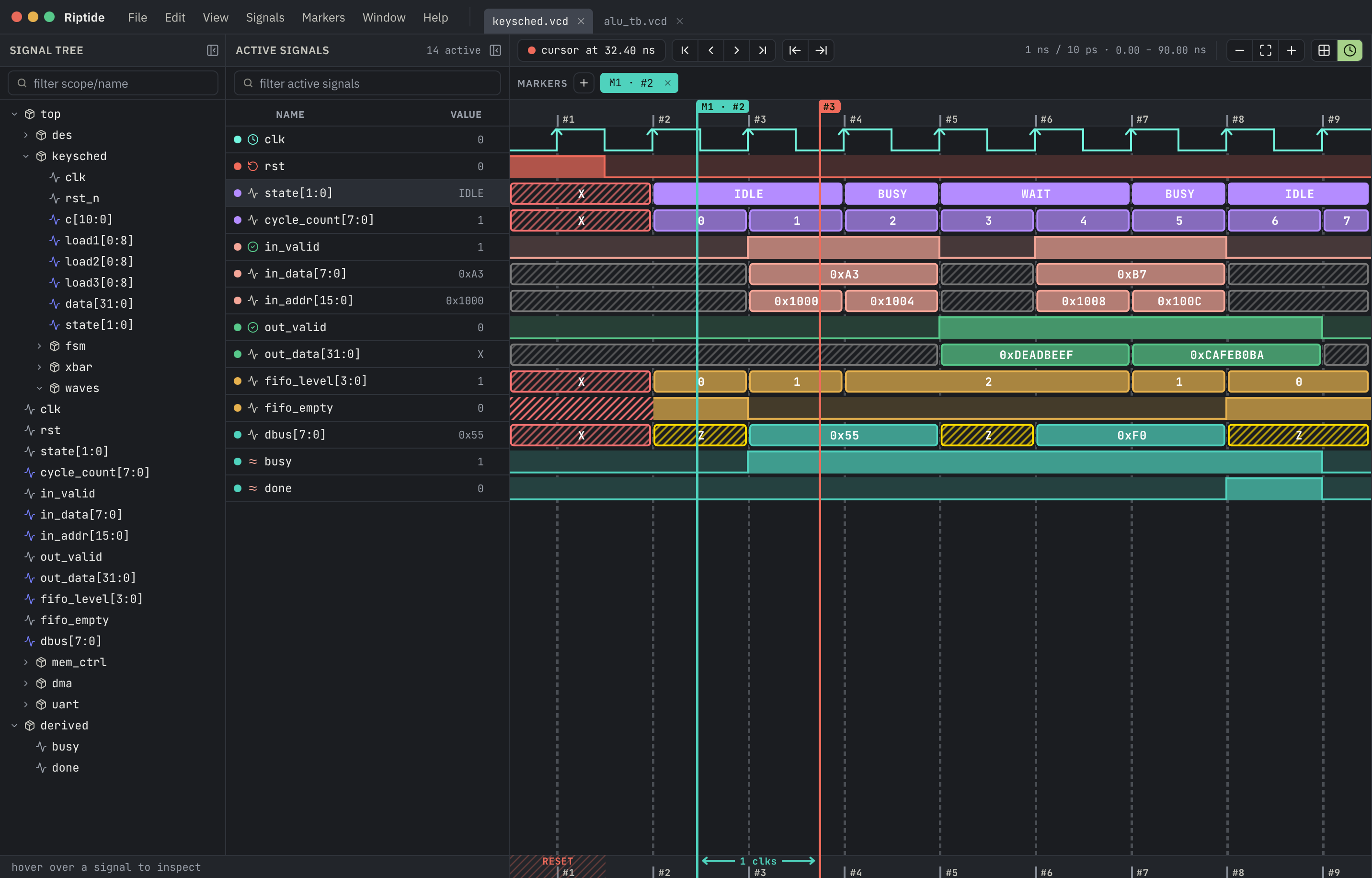
The Riptide waveform viewer showing the keysched module — signal tree, active signals, and aligned waveforms
10M+
Transitions in a trace, with pan and zoom that stay smooth.
60 fps
Held steady across the whole UI and the waveform viewport alike.
WebGPU
Hardware-accelerated rendering, built on a modern graphics stack.
Pixel-perfect
Crisp, anti-aliased edges and labels — sharp at any zoom or display scale.
// CLARITY

Read the signal, not the clutter.

A real trace is mostly things you don't care about — gated logic, idle buses, duplicate strobes. Riptide is tuned for contrast: adjacent rows stay visually distinct, and signals with nothing to say are muted out of the way.

  • Clock-aware gridRiptide's timeline understands your design's clock, letting you line up and navigate clock cycles, not nanoseconds.
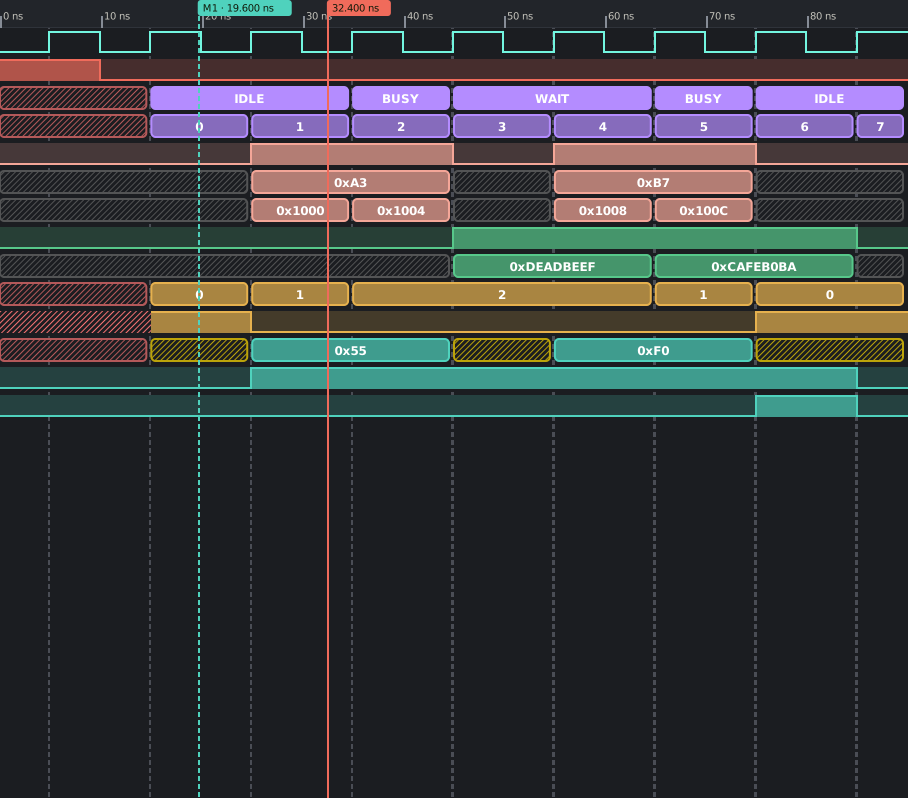
  • Typed bus & enum labelsClear, easy to read value rendering with different format options. Assign enum values, even if your waveform data doesn't include it. Unknown (X) and high-impedance (Z) values are visually distinctive.
  • Signal mutingInactive or disabled rows fade back so the real data leads the eye.
Riptide waveform canvas — clock, buses, enum states and hatched X/Z bands aligned to one time grid
// SCALE

Big traces stay smooth.

Most viewers slow down as the trace grows. Riptide doesn't. It only works on the stretch of waveform you're actually looking at, so panning and zooming a ten-million-transition trace feels exactly like a tiny one — no lag creeping in as your runs get longer.

  • Smooth at any sizePan and zoom stay fluid whether the trace is kilobytes or gigabytes.
  • Hardware-acceleratedThe whole canvas is drawn on your graphics card, built on modern WebGPU.
  • Swap traces in placeOpen a fresh run and the view updates where it stands — no reload, no flash.
// QUERY

Ask the waveform a question. *

A trace shouldn't just sit there. Today Riptide gives you markers you can drop, name and step between; next it will compose derived signals, keep a live watch on what matters, and surface the glitches, failed asserts and look-alike events you'd otherwise scroll right past.

* coming soon

// CONTROL

One surface for every simulator. *

Beyond recorded waveforms, Riptide drives live simulation. It leans on Edalize to speak Tcl to whatever backend you run — so the same run, step and poke work everywhere, instead of a different clunky UI per tool.

  • Uniform control surfacerun · step · restart · poke — identical across backends.
  • Powered by EdalizeA battle-tested Tcl abstraction over the EDA tool zoo.
  • No vendor lock-inSwap the simulator under your testbench, keep your flow.

* coming soon

// ORGANIZATION

Order the list the way you read it.

The active-signal list is yours to shape. Recolor any row, give the buses the height they need, drag rows into the order the design actually runs in, and drop dividers between blocks so a handshake reads as a handshake. Rows you're done with dim out of the way instead of cluttering the view.

  • Color, height, orderPer-row color and height, drag to reorder — every choice persists with the trace.
  • Dividers & dimmingSeparate blocks with dividers; dim a row, or dim everything else, to focus on one story.
  • Mute on an enablePoint a row at its 1-bit enable and it fades wherever the logic is gated off.
  • Logical groups *Collapse a handshake or a valid/data pair into one row you move as a unit.

* coming soon

// HANDOFF

Hand over the bug, not the trace.

Riptide keeps viewer state in a small JSON sidecar beside the trace — which signals, what order, colors, cursor, markers, zoom. It's tied to signal names, so the same sidecar opens against any run of the design. Drop a VCD and a sidecar from a failing CI job into review: the reviewer double-clicks and lands on the failure window, the right signals already up.

  • Portable across runsTied to signal names, so the same view opens against any run of the design.
  • Scriptable for CIA script writes the view section; Riptide fills the rest in.
  • Autosaved, no projectsEvery change is written back — delete the file to open fresh.
keysched.vcd.sidecar.json
"view": {
  "time": { "start": 88, "end": 132, "cursor": 104.5 },
  // keyed by path — opens against any run
  "signals": [
    { "path": "top.dec.in_valid" },
    { "path": "top.dec.out_data", "radix": "hex" }
  ],
  "markers": [
    { "name": "handshake drops", "tick": 104 }
  ]
}

Land on the bug, first run.

Stop staring endlessly at green waves. Open it where it broke, with the right signals already on screen.

Alpha builds are unsigned — macOS needs right-click ▸ Open on first launch; Windows SmartScreen needs More info ▸ Run anyway.